Away from the Computer, Still in the Same Task: Engineering Open Nua Remote Control
Open Nua Engineering
Start an Agent task on your computer, then leave with your phone. When the task needs a decision, respond from the phone. When it produces a report, open it. When another question comes to mind, send a follow-up. Back at the computer, you are still in the same conversation.
That is the experience Open Nua Remote Control aims to deliver.
It sounds like a small feature: add a mobile page to a desktop application. Building it revealed a harder problem—keeping connectivity, identity, session state, and mobile interaction consistent through interruptions.
A successful connection is only the beginning.
Execution stays on the local computer
Remote Control operates on Agent sessions. The phone can browse history, create sessions, send messages, cancel execution, answer human confirmation requests, and preview artifacts. Screen sharing and remote mouse or keyboard control are outside this product's scope.
That boundary shapes the architecture. The Host on the local computer continues to manage sessions and execution. The phone reads the state the Host publishes and submits explicit operation requests. Model calls, tools, workspaces, and security policy remain under desktop control.
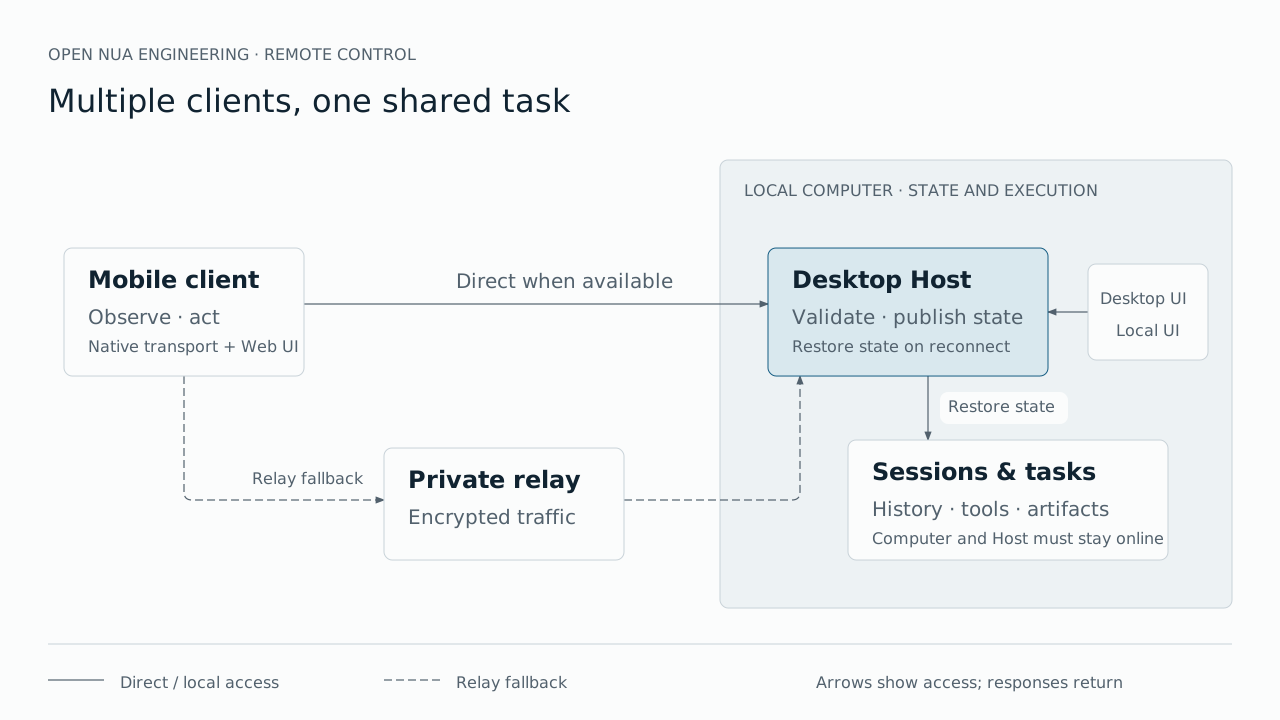
A mobile disconnection should not be interpreted as a request to cancel a task. When the user returns, the client must recover the Host's current state rather than guess what happened from the contents left on screen. Continued execution depends on the local computer and Host remaining available; sleep or shutdown affects remote access.
Make access work, then seek a direct path
A computer at home or in the office usually sits behind a router. The phone may use another Wi-Fi network or a cellular connection. Whether the devices can communicate directly depends on address mappings, firewalls, and network restrictions.
We therefore do not make direct connectivity a prerequisite for using the product. The devices establish communication through a reachable private relay and attempt to discover a direct path. When that path becomes available, they use it. Otherwise, traffic continues through the relay.
Users do not have to classify their network before getting started. The interface can show the connection path, while failure to optimize that path need not mean failure to access a session.
Testing requires the same distinction. A direct connection on one local network proves that local path works. To prove the relay carries product traffic, the phone and computer must use different public networks, with direct communication ruled out, while actually reading sessions, sending messages, and receiving results.
We kept separate evidence for direct and forced-relay connections. Each successful test demonstrates the network combination it exercised, not universal reachability.
A connection raises three identity questions
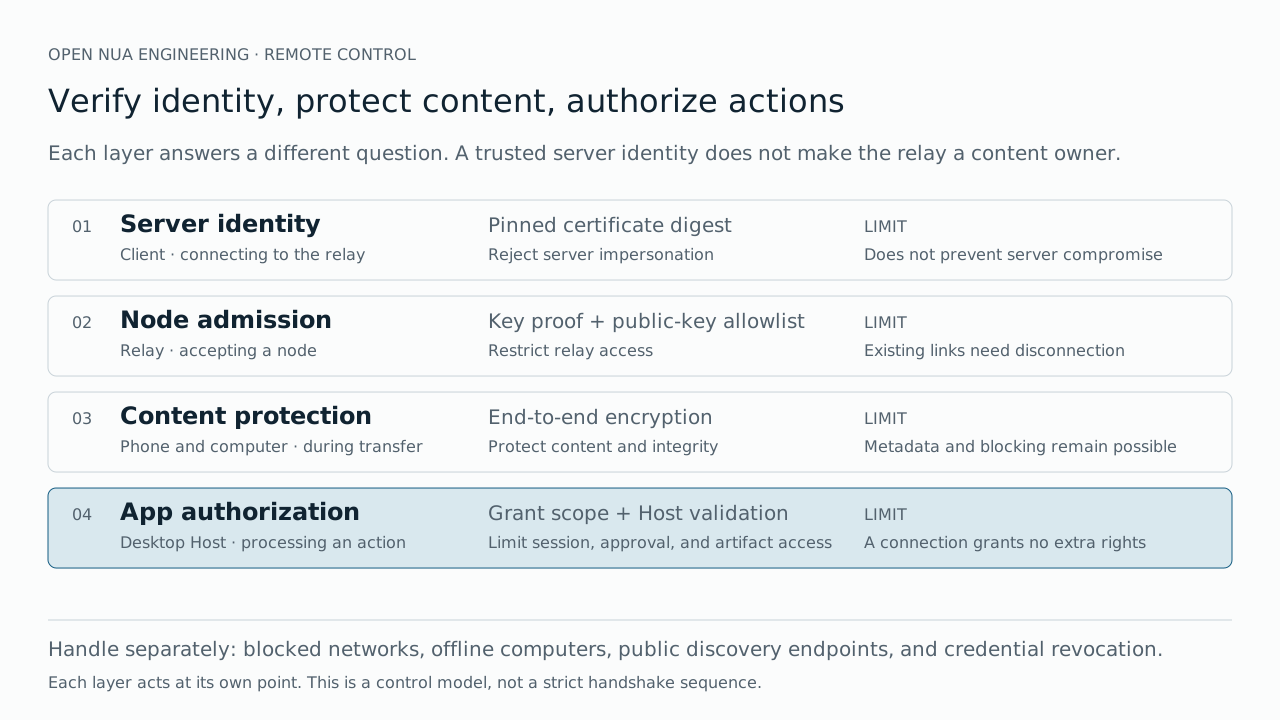
Is the phone reaching the expected relay? Which devices should the relay admit? What may an admitted device do on the desktop?
Three controls answer these questions.
First, the client pins the relay server's certificate digest. The certificate presented during connection establishment must match that configured digest. This establishes server identity; it does not guarantee that a server holding that certificate can never be compromised.
Second, each node has its own private and public key. When connecting, it submits its public key and proves possession of the corresponding private key through a cryptographic handshake. The relay admits only allowlisted nodes. Knowing the address or certificate digest, or copying an authorized public key, does not grant relay access.
Third, the desktop Host checks application authorization. A connected client may use only the permitted session capabilities. Workspace selection, models, confirmation options, and artifact access remain subject to Host validation.
Application data is encrypted end to end between the phone and local computer. The relay can observe connection addresses, timing, and traffic volume, and can delay or block traffic. Relay access alone does not expose session plaintext.
Pairing delivers authority; revocation has multiple layers
The current pairing flow displays a QR code on the desktop for the phone to scan. The desktop creates an independent device identity and delivers connection information and application authorization through the code. The phone validates and saves the credentials in local secure storage; the desktop deletes the temporary device private key when pairing completes.
The pairing code is therefore a sensitive credential. Its import window is limited, but expiration of that window does not automatically invalidate the node private key inside it. An identity already delivered must be invalidated by revoking authorization or rotating keys.
A future improvement is to generate the private key on the phone and deliver only its public key to the desktop, keeping the private key on its originating device from the start.
Revocation also has two meanings. Desktop revocation removes business access; removing a public key from the cloud allowlist removes permission to use the private relay.
Relay admission currently happens when a connection is established. Updating the allowlist does not automatically evict existing connections. We synchronize public keys through a controlled script and restart the single relay so existing connections face admission again. All clients briefly reconnect. Cloud synchronization after pairing or revocation remains an operational step rather than an automated workflow.
Node admission also does not cover the separate address-discovery service. That public network entry point needs its own capacity, protection, and availability considerations.
A session created on the phone must exist on the desktop
An early acceptance test exposed a revealing failure: the phone could create a session and send messages, but the desktop could not find that session.
Testing only mobile send-and-reply would have suggested the feature was complete. Yet “new session” makes a larger promise: the session belongs in the same persistent catalog, is discoverable on the desktop, and can be reopened after closing a client.
Remote creation therefore has to enter the Host's persistent session workflow. The session list must combine the persistent catalog with live state rather than enumerate only active in-memory objects. Opening a session then restores its history and subscription.
Model selection exposed a related issue. A user selected a model on the phone, closed the app, and reopened the session to find the default model displayed again.
The choice had existed only in client-local state. The Host needed to accept and persist session configuration, then return it during recovery. Workspaces, reasoning effort, and personal knowledge scope follow the same rule.
The remote client submits its intended selection. The Host publishes available choices, validates the request, and persists the result. Reopening the interface should show that saved choice.
Mobile interaction needs its own design
We use a hybrid client: the native layer handles connections, credentials, scanning, and application lifecycle; the Web interface handles session lists, details, and composition.
This division accommodates device capabilities while allowing the session client to serve future entry points. Sharing client capabilities, however, does not turn a reduced desktop page into a usable mobile interface.
Acceptance testing made the differences tangible. Back navigation needs gestures and transitions. The keyboard must not cover the composer. Long code blocks must not make the entire page scroll horizontally. The interface must follow the system's dark mode.
The composer also needs more than text submission. Continuing work requires selecting an existing workspace, a model and reasoning effort, invoking commands or skills, and choosing personal knowledge scope. The phone supports existing workspaces; workspace creation remains on the desktop.
Artifacts are part of the session experience too. Markdown should render as a document, and HTML reports need a separate preview. Preview access is restricted to artifacts authorized by the current session, with scripts, external connections, and navigation isolated. Opening a report must not become arbitrary access to local files.
Human confirmation remains a Host decision
The phone must handle confirmation requests, or a task can still stall behind a button on the desktop.
Displaying a confirmation does not give the phone new security authority. The Host publishes the pending request and its options. The client submits the user's choice. The Host checks that the request is still valid, the option exists, and another client has not already handled it.
The same request may appear on both devices, but it must be accepted only once. A late response must not trigger execution again, and reconnecting must not restore an answered request as pending.
Human confirmation is therefore both an interface capability and a Host concurrency and authorization contract.
“Connected” requires continuing evidence
After adding authorized-device connection status, we encountered an immediate question: why did the desktop still show the phone online after the app had been force-quit?
A disappearing client does not always deliver a prompt connection-close notification. Retaining a connection object does not prove that the connection remains usable.
We added lightweight heartbeats to remote connections. After several consecutive checks without a response, the Host terminates the stale connection and updates presence. Online status stays in memory, while the latest successful connection time is persisted. Restarting the Host must not restore yesterday's “online” flag as a current fact.
The timestamp has a precise meaning: it records the latest establishment of a valid session connection. It is neither the last user action nor the exact time the device went offline.
Test waiting, interruption, and recovery
Some problems become obvious only outside the local network. Session lists and details may take time to load. Without immediate feedback, a tap appears to do nothing and invites repeated taps.
We added loading and busy states, then used controlled delays to verify that feedback appears when it is needed. The test is about both the final content and whether the waiting user understands what is happening.
Verification uses complementary layers. Interface tests cover rendering, input, and selection. Simulator automation covers the native shell, integrated pages, navigation, and lifecycle. Tests connected to the real desktop Host cover persistent-session visibility and recovery. Physical-device acceptance covers public networks, relay paths, network switching, and actual interaction.
Simulator tests do not substitute for a real cellular connection, and relay-port reachability does not substitute for a complete session operation. Each piece of evidence proves only the path it exercised.
One task, multiple entry points
On the iPhone, users can find desktop sessions and create new ones, continue messages, handle confirmations, inspect results, and recover authoritative Host state after interruption.
The local computer must still be online. The relay is still a single node. Cloud device authorization still requires controlled synchronization. Additional mobile platforms and phone-generated pairing keys remain separate work.
Remote Control validates a promise of the session architecture: when execution, state, and client responsibilities are clear, a phone can provide another way to interact with the same work. The user leaves the computer behind; the task and its context remain there.